Graph Engineering Needs a Remote Control
In July, Peter Steinberger asked a short question that caught the AI-builder world at exactly the right moment: “Are we still talking loops or did we shift to graphs yet?”
The joke travelled because it exposed a real change in the work. A single agent can plan, act, inspect a result and try again. That is a loop. But useful systems quickly need more: one task starts two specialists in parallel, another waits for both, a review gate decides whether to continue, and a scheduler starts the whole thing tomorrow at 09:00.
That is not one loop. It is a graph.
Graph engineering makes execution explicit
The useful part of graph engineering is not the new label. It is making the execution of an AI system visible and deliberate:
- Nodes own a piece of work — an agent, a task, or a control step.
- Edges say what happens next and carry files and context forward.
- Branches let independent work run in parallel.
- Merges wait until the right work is complete before continuing.
- Schedules turn a graph into a system that runs when it should, not only when someone remembers to click Run.
A loop does not disappear. It can live inside a node, where an agent reasons, uses tools and checks its own work. The graph is the layer around it: the part that decides which agent works, which output moves forward, where to pause, and what must finish before the next decision.
That distinction is the practical insight behind the recent discussion. Graphs do not make agents intelligent. They make the system around them easier to direct, inspect and change. Two useful perspectives are explainX’s case for programmable multi-agent organizations and The AI Operator’s field guide, which separates orchestration graphs from graph-shaped knowledge and memory.
CTRL NODE is a control plane for that graph
CTRL NODE is built for the moment when an agent is no longer just a chat window or one long-running process.
In the browser, you design an AI agent graph: assign an agent to each node, connect the paths that work should follow, and add a schedule when the graph needs to run again. The browser is the control plane. It shows the shape of the system and the live progress of every node.
The work itself runs through the Bridge on your machine. Your project files, local tools and provider credentials stay where the work is happening. CTRL NODE sends the task to the right local agent and streams the activity back to the browser over its outbound connection — no inbound port, no exposed development machine.
That is what makes graph engineering useful for real local information. The graph can coordinate agents that work on the code, documents and artifacts already in your work directory instead of asking you to copy everything into a new service first.
The execution graph
CTRL NODE turns an agent system into an execution graph: agents, tasks, branches, merges, schedules and the files that move from one step to the next. It makes the operating model visible before the run begins and observable while it is running.
That gives teams a practical way to create reliable AI systems around their local work. A researcher can gather evidence, a specialist can inspect it, a writer can turn it into an artifact, and a reviewer can decide whether it is ready. CTRL NODE connects those roles and runs them against the information you already own.
A daily graph, not a daily prompt
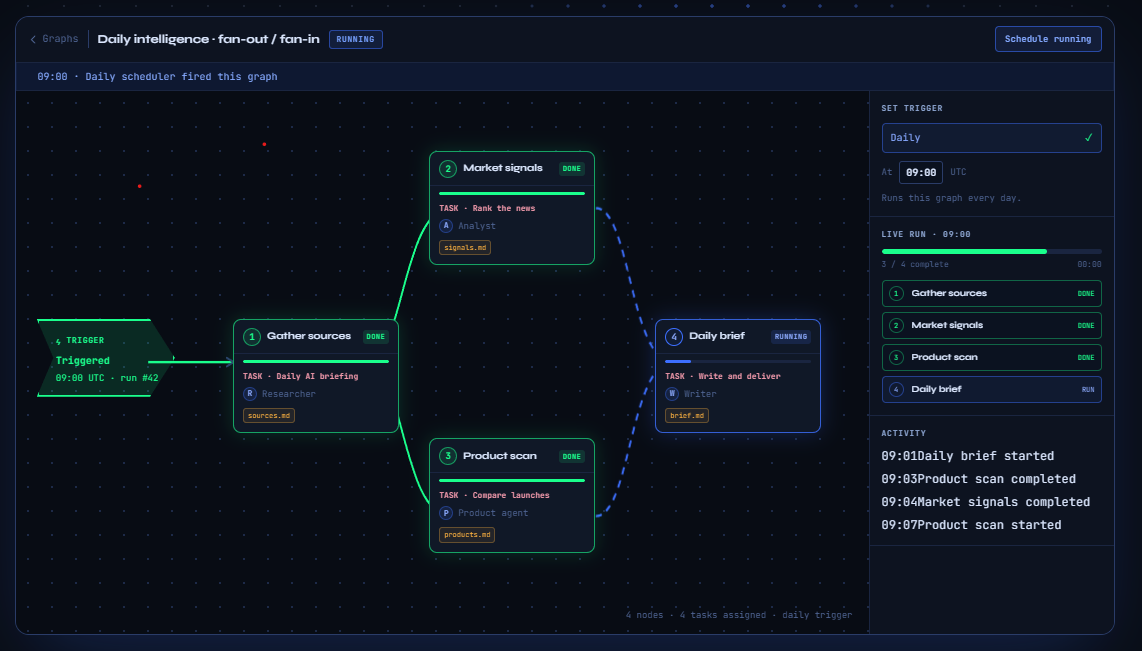
Imagine a daily intelligence brief:
- At 09:00, a scheduler starts the graph.
- A first node collects the task context from the local work directory.
- Two agents run in parallel: one watches market signals; the other checks product changes.
- Their files and summaries merge into a final brief.
- The last node writes the deliverable locally, ready for review or the next graph run.
No one has to coordinate the handoffs in a chat. The graph does it. And when a node fails or needs a human decision, you can see exactly where the system is waiting from the browser.
The same pattern fits a code review pipeline, a recurring research report, a content production system, or any job where the right answer is not "give one agent a giant prompt and hope." Start with the structure you know. Let each agent own the part where it is strongest.
Design the graph. Keep the work local.
The new vocabulary is useful when it helps us build better systems. For CTRL NODE, graph engineering means a simple promise:
Design the path in your browser. Run the agents on your machine. Keep control of every handoff.
You can explore AI agent graphs, set up the Bridge, or see the open-source Bridge on GitHub.